Obtaining Specialized Log File
1) Editing OccultWatcher.exe.config
2) Getting a DebugView log file
3) Reverting changes to OccultWatcher.exe.config
1. Editing OccultWatcher.exe.config
1.1. In the OccultWatcher folder find the file called OccultWatcher.exe.config. Open the file in a text editor, for example Notepad.
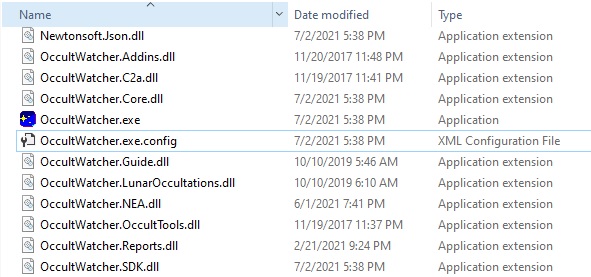
1.2. Scroll down a little until you find a section that looks like this:
  <system.diagnostics>
    <switches>
      <add name="EventsFilter" value="0" />
      <add name="UIEvents" value="0" />
      <add name="PathInterpolator" value="0" />
      <add name="PathBuilder" value="0" />
      <add name="EventHighlight" value="0" />
      <add name="InternetActivity" value="0" />
      <add name="Reminder" value="0" />
    </switches>
  </system.diagnostics>
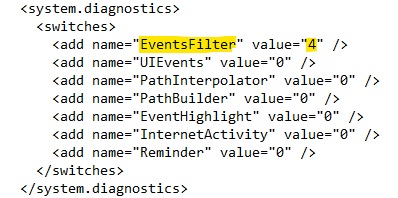
1.3. Edit the value of the relevent switch changing it from 0 to 4. For example this has set the value of the EventsFilter switch to 4:
1.4. Restart OccultWatcher so the new settings are picked up.
2. Getting a DebugView log file
2.1. Download DebugView from Microsoft's web site and unzip the content of the zip file in C:\DebugView or another location
2.2. Run DebugView from the location you have coppied it to in (2.1) and from the Capture menu make sure you have "Capture Win32" and "Capture Global Win32" options checked. You may or may not have the both options available but at least one of them should be there.

2.3. Now perform the operation for which specialized logging is to be obtained. Note that OccultWatcher may be running slower than usual.
2.4. If you see lots of output in DebugView then when you have log entries. Wait until new log entries have stopped being shown. Choose File -> Save As and save the log file from DebugView. Then send the log file for analisys.
3. Reverting changes to OccultWatcher.exe.config
3.1. Make sure that you revert the changes you made in step 1 and restart OccultWatcher. If you don't revert the changes OccultWatcher may be working signifficantly slower than normal.